Opentofu로 프로비저닝도 완료하고 형상 관리 내부 저장소 구축도 토푸와 앤서블로 했으니 쿠버네티스 클러스터 구성만 남았음
다시 ansible 작업 폴더로 들어가서 CRI-O 런타임이랑 쿠버네티스 저장소를 추가하고 설치하는 yaml파일을 작성해줌
쿠버네티스 클러스터가 작동하기 위해서는 br_netfilter 커널 모듈이 활성화되고 ip포워딩 커널 파라미터가 활성화되어야 함
swap 영역도 없애고 쿠버네티스는 열어둬야 하는 각종 포트가 많아서 여기선 방화벽이랑 se리눅스를 편리하게 꺼두도록 함
[root@IaC ansible]# vi k8s-install.yaml
- name: Kubeadm, Kubelet, Kubectl 설치 및 설정
  hosts: k8s_cluster, haproxy
  become: yes
  vars:
    kubernetes_version: "1.32"
    crio_version: "1.32"

  tasks:
    - name: SWAP 비활성화 및 영구 설정
      ansible.builtin.shell: swapoff -a && sed -i '/ swap / s/^/#/' /etc/fstab
      changed_when: true

    - name: sysctl을 통해 IP 포워딩 활성화 및 파일 생성
      ansible.builtin.copy:
        content: |
          net.ipv4.ip_forward=1
        dest: /etc/sysctl.d/01-ip_forward.conf
        mode: '0644'

    - name: br_netfilter 모듈 로드 설정
      ansible.builtin.copy:
        content: |
          br_netfilter
        dest: /etc/modules-load.d/01-br_netfilter.conf
        mode: '0644'

    - name: br_netfilter 모듈 로드 및 sysctl 적용
      ansible.builtin.command: "{{ item }}"
      loop:
        - modprobe br_netfilter
        - sysctl -w net.ipv4.ip_forward=1
      changed_when: true

    - name: SELinux 비활성화
      ansible.posix.selinux:
        state: disabled

    - name: Firewalld 비활성화 및 중지
      ansible.builtin.service:
        name: firewalld
        state: stopped
        enabled: false

    - name: 쿠버 저장소 추가하기
      ansible.builtin.copy:
        content: |
          [kubernetes]
          name=Kubernetes
          baseurl=https://pkgs.k8s.io/core:/stable:/v{{ kubernetes_version }}/rpm/
          enabled=1
          gpgcheck=1
          gpgkey=https://pkgs.k8s.io/core:/stable:/v{{ kubernetes_version }}/rpm/repodata/repomd.xml.key
        dest: /etc/yum.repos.d/kubernetes.repo


    - name: Control Plane 및 Worker 노드에 Kubelet/Kubeadm 설치
      ansible.builtin.dnf:
        name:
          - kubelet
          - kubeadm
        state: present
        disable_excludes: kubernetes
      when: inventory_hostname in groups['control'] or inventory_hostname in groups['worker']

    - name: control 이랑 haproxy에 Kubectl 설치 (관리용)
      ansible.builtin.dnf:
        name:
          - kubectl
        state: present
        disable_excludes: kubernetes
      when: inventory_hostname in groups['control'] or inventory_hostname in groups['haproxy']

    - name: Kubelet 서비스 활성화 (Worker 랑 Control 노드만)
      ansible.builtin.service:
        name: kubelet
        state: started
        enabled: yes
      when: inventory_hostname in groups['control'] or inventory_hostname in groups['worker']

    - name: CRIO 저장소 추가
      ansible.builtin.copy:
        content: |
          [crio]
          name=CRI-O
          baseurl=https://pkgs.k8s.io/addons:/cri-o:/stable:/v{{ crio_version }}/rpm/
          enabled=1
          gpgcheck=1
          gpgkey=https://pkgs.k8s.io/addons:/cri-o:/stable:/v{{ crio_version }}/rpm/repodata/repomd.xml.key
        dest: /etc/yum.repos.d/crio.repo
      when: inventory_hostname in groups['control'] or inventory_hostname in groups['worker']

    - name: CRIO 설치
      ansible.builtin.dnf:
        name: cri-o
        state: present
      when: inventory_hostname in groups['control'] or inventory_hostname in groups['worker']

    - name: CRIO 실행 중인지 확인
      ansible.builtin.service:
        name: crio
        state: started
        enabled: yes
      when: inventory_hostname in groups['control'] or inventory_hostname in groups['worker']
클러스터를 구성하기 위해 임의로 컨트롤 플레인 3대 워커 5대로 HA 클러스터를 목표로 구성하도록 함
컨트롤 플레인의 로드밸런싱을 위해서 앞 단에 haproxy를 사용하도록 함
그 전에 haproxy가 설치되면 /etc/haproxy/haproxy.cfg 이 파일을 보고 처리되니 jinja2 템플릿 파일을 미리 작성해줌
진자 템플릿 형식이라 .j2로 저장해줌
[root@IaC ansible]# vi haproxy.cfg.j2
global
  log 127.0.0.1 local2
  chroot /var/lib/haproxy
  pidfile /var/run/haproxy.pid
  maxconn 4000
  user haproxy
  group haproxy
  daemon

defaults
  mode tcp
  log global
  timeout connect 5000
  timeout client 50000
  timeout server 50000

listen kube-apiserver
  bind {{ control_plane_ip }}:6443
  mode tcp
  option tcplog
  balance roundrobin

  {% for ip in control_node_ips %}
  server control{{ loop.index }} {{ ip }}:6443 check
  {% endfor %}
이후 실제 클러스터 구성을 자동화 해주는 최종 yaml파일을 작성하고 적용해주면 된다.
먼저 hostname을 보는데, 이게 맞지 않으면 경고 문구를 띄우기 때문에 IaC 노드에 정의된 호스트네임으로 각각 맞춰준다
그 다음 haproxy 노드를 빼서 따로 설치와 .j2 템플릿에 맞춰 컨트롤 플레인 노드들을 설정 파일에 추가하고 재실행(활성화 시켜놓음)
이제 쓰일 변수로 flannel CNI의 기본 CIDR와 로드밸런서으 6443번을 지정해놓고 시작
컨트롤 플레인 중 하나인 1번에서 초기화를 진행시키고 컨트롤과 워커 노드들을 컨트롤 1번에서 생성한 토큰과 인증서를 기반으로 붙여 클러스터 구성을 함
이후 haproxy 쪽에서 kubectl로 클러스터 관리를 할 수 있게 con1 -> haproxy로 admin.conf를 복사해서 넘겨주도록 함
컨트롤 노드에서 초기화를 진행할 때 엔드포인트를 HAproxy쪽으로 지정해서 외부에서 트래픽이 들어오면 이쪽으로 감
HAproxy는 6443번으로 들어오면 컨트롤 3대 중 하나로 보내게 되어 로드밸런싱이 되게 됨
또, 클러스터 내 pod 네트워크를 지정해주는 게 있는데 CNI라고 정해줘야 서로 통신이 돼서 이걸 지정해준 게 Flannel 네트워크다.
[root@IaC ansible]# vi k8s-clustering.yaml
- name: 클러스터 노드 호스트 이름 설정
  hosts: all
  become: yes
  tasks:
    - name: 호스트 이름 변경
      ansible.builtin.hostname:
        name: "{{ inventory_hostname }}"

- name: HAProxy 설정 및 k8s 클러스터 초기화 준비
  hosts: haproxy
  become: yes
  vars:
    control_plane_ip: "{{ hostvars[inventory_hostname]['ansible_host'] }}"
    control_node_ips: "{{ groups['control'] | map('extract', hostvars, 'ansible_host') | list }}"

  tasks:
    - name: HAProxy 설치
      ansible.builtin.dnf:
        name: haproxy
        state: present

    - name: HAProxy 설정 파일 (haproxy.cfg) 생성
      ansible.builtin.template:
        src: haproxy.cfg.j2
        dest: /etc/haproxy/haproxy.cfg
      notify:
        - Restart haproxy service

    - name: HAProxy 서비스 시작 및 활성화
      ansible.builtin.service:
        name: haproxy
        state: started
        enabled: yes

  handlers:
    - name: Restart haproxy service
      ansible.builtin.service:
        name: haproxy
        state: restarted


- name: 컨트롤 플레인 초기화 및 조인
  hosts: control
  become: yes
  vars:
    load_balancer_dns: "{{ hostvars['proxy']['ansible_host'] }}:6443"
    pod_cidr: "10.244.0.0/16"


  tasks:
    - name: 클러스터 초기화 (control1)
      ansible.builtin.shell: |
        kubeadm init \
          --control-plane-endpoint "{{ load_balancer_dns }}" \
          --upload-certs \
          --pod-network-cidr "{{ pod_cidr }}" \
          --cri-socket unix:///var/run/crio/crio.sock \
      register: kubeadm_init_result
      when: inventory_hostname == 'control1'

    - name: Worker Join Command 추출 및 변수 설정
      ansible.builtin.shell: |
        kubeadm token create --print-join-command
      register: worker_join_cmd_raw
      when: inventory_hostname == 'control1'

    - name: Worker Join Command 변수 설정
      ansible.builtin.set_fact:
        join_command_worker: "{{ worker_join_cmd_raw.stdout | replace('\n', '') }}"
      when: inventory_hostname == 'control1'

    - name: Control Plane 인증서 키 추출 (Control Plane Joine Command 재구성용)
      ansible.builtin.shell: |
        kubeadm init phase upload-certs --upload-certs | tail -n 1
      register: cert_key_raw
      when: inventory_hostname == 'control1'

    - name: Control Plane Join Command 변수 설정
      ansible.builtin.set_fact:
        join_command_cp: "{{ hostvars['control1']['join_command_worker'] | trim }} --control-plane --certificate-key {{ cert_key_raw.stdout | trim }} --ignore-preflight-errors=FileAvailable--etc-kubernetes-kubelet.conf,Port-10250"
      when: inventory_hostname == 'control1'

    - name: 나머지 Control Plane 노드 조인 (control2, control3)
      ansible.builtin.shell: "{{ hostvars['control1']['join_command_cp'] }} --cri-socket unix:///var/run/crio/crio.sock"
      when:
        - inventory_hostname != 'control1'
        - hostvars['control1']['join_command_cp'] is defined
        - hostvars['control1']['join_command_cp'] | length > 0

    - name: admin.conf 파일을 HAProxy 노드로 복사
      ansible.builtin.fetch:
        src: /etc/kubernetes/admin.conf
        dest: "{{ inventory_dir }}/fetched_config/{{ inventory_hostname }}/admin.conf"
        flat: yes
      when: inventory_hostname == "control1"

    - name: 복사된 admin.conf를 HAProxy 노드의 /root/.kube/config로 이동
      ansible.builtin.copy:
        src: "{{ inventory_dir }}/fetched_config/control1/admin.conf"
        dest: /root/.kube/config
        remote_src: no
        owner: root
        group: root
        mode: '0600'
      run_once: true
      delegate_to: haproxy


- name: 워커 노드 조인
  hosts: worker
  become: yes
  tasks:
    - name: 워커 노드 조인 실행
      ansible.builtin.shell: "{{ hostvars['control1']['join_command_worker'] }} --cri-socket unix:///var/run/crio/crio.sock --ignore-preflight-errors=FileAvailable--etc-kubernetes-kubelet.conf,Port-10250,FileAvailable--etc-kubernetes-pki-ca.crt"


- name: Flannel CNI 설치
  hosts: control1
  become: yes
  tasks:
    - name: Flannel CNI 설치 전 대기 (Control Plane 안정화)
      ansible.builtin.pause:
        seconds: 15
        prompt: "Waiting for Control Plane to be fully ready before installing CNI..."

    - name: Flannel CNI 적용
      ansible.builtin.command: kubectl apply --kubeconfig /etc/kubernetes/admin.conf -f https://github.com/flannel-io/flannel/releases/latest/download/kube-flannel.yml
      delegate_to: control1
그러면 이렇게 2개 파일로 나눠 작성됐는데 실행은 간단하게 그냥 하면 됨
자동화 코드를 작성하는 게 좀 복잡해서 그렇지 다 맞게 되면 실행 자체는 매우 간단
[root@IaC ansible]# ansible-playbook -i hosts k8s-install.yaml
[root@IaC ansible]# ansible-playbook -i hosts k8s-clustering.yaml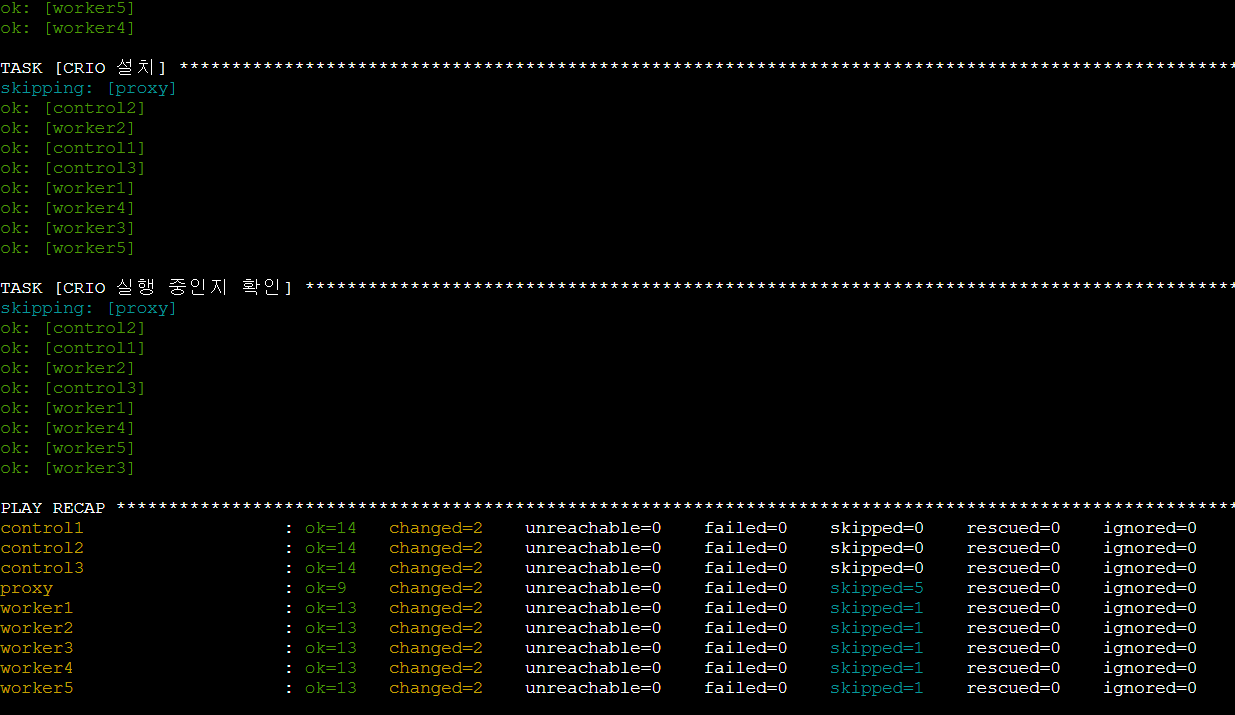
CNI까지 잘 붙었나 확인하기 위해 테스트 웹서버 1개를 배포해서 외부에서 웹콘솔로 확인해보면 됨.
실행된 pod의 IP가 아까 설정한 Flannel의 디폴트 네트워크에 잘 안착한 게 확인이 됨 상태도 문제없이 Running
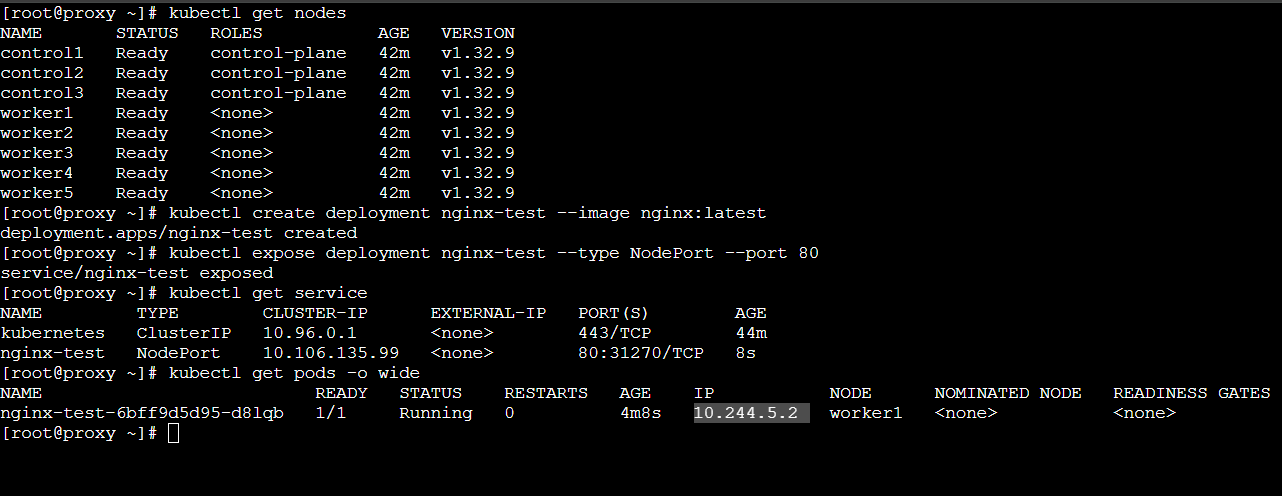
그래서 자세한 정보는 이런 식으로 확인이 가능
[root@proxy ~]# kubectl get nodes
NAME       STATUS   ROLES           AGE   VERSION
control1   Ready    control-plane   42m   v1.32.9
control2   Ready    control-plane   42m   v1.32.9
control3   Ready    control-plane   42m   v1.32.9
worker1    Ready    <none>          42m   v1.32.9
worker2    Ready    <none>          42m   v1.32.9
worker3    Ready    <none>          42m   v1.32.9
worker4    Ready    <none>          42m   v1.32.9
worker5    Ready    <none>          42m   v1.32.9
[root@proxy ~]# kubectl create deployment nginx-test --image nginx:latest
deployment.apps/nginx-test created
[root@proxy ~]# kubectl expose deployment nginx-test --type NodePort --port 80
service/nginx-test exposed
[root@proxy ~]# kubectl get service
NAME         TYPE        CLUSTER-IP      EXTERNAL-IP   PORT(S)        AGE
kubernetes   ClusterIP   10.96.0.1       <none>        443/TCP        44m
nginx-test   NodePort    10.106.135.99   <none>        80:31270/TCP   8s
[root@proxy ~]# kubectl get pods -o wide
NAME                          READY   STATUS    RESTARTS   AGE    IP           NODE      NOMINATED NODE   READINESS GATES
nginx-test-6bff9d5d95-d8lqb   1/1     Running   0          4m8s   10.244.5.2   worker1   <none>           <none>
[root@proxy ~]# kubectl get nodes -o wide
NAME       STATUS   ROLES           AGE   VERSION   INTERNAL-IP   EXTERNAL-IP   OS-IMAGE                      KERNEL-VERSION                 CONTAINER-RUNTIME
control1   Ready    control-plane   50m   v1.32.9   10.0.4.241    <none>        Rocky Linux 9.6 (Blue Onyx)   5.14.0-570.18.1.el9_6.x86_64   cri-o://1.32.1
control2   Ready    control-plane   50m   v1.32.9   10.0.5.22     <none>        Rocky Linux 9.6 (Blue Onyx)   5.14.0-570.18.1.el9_6.x86_64   cri-o://1.32.1
control3   Ready    control-plane   50m   v1.32.9   10.0.2.133    <none>        Rocky Linux 9.6 (Blue Onyx)   5.14.0-570.18.1.el9_6.x86_64   cri-o://1.32.1
worker1    Ready    <none>          50m   v1.32.9   10.0.3.249    <none>        Rocky Linux 9.6 (Blue Onyx)   5.14.0-570.18.1.el9_6.x86_64   cri-o://1.32.1
worker2    Ready    <none>          50m   v1.32.9   10.0.5.69     <none>        Rocky Linux 9.6 (Blue Onyx)   5.14.0-570.18.1.el9_6.x86_64   cri-o://1.32.1
worker3    Ready    <none>          50m   v1.32.9   10.0.3.165    <none>        Rocky Linux 9.6 (Blue Onyx)   5.14.0-570.18.1.el9_6.x86_64   cri-o://1.32.1
worker4    Ready    <none>          50m   v1.32.9   10.0.3.6      <none>        Rocky Linux 9.6 (Blue Onyx)   5.14.0-570.18.1.el9_6.x86_64   cri-o://1.32.1
worker5    Ready    <none>          50m   v1.32.9   10.0.5.126    <none>        Rocky Linux 9.6 (Blue Onyx)   5.14.0-570.18.1.el9_6.x86_64   cri-o://1.32.1
인터널 IP는 오픈스택의 내부망 네트워크고 서비스의 클러스터 IP는 가상 IP로 pod로 접근하기 위한 중간 지점, pod의 IP는 pod 간 통신을 위한 네트워크로 CNI를 통해 구성된 네트워크다
현재 pod가 worker1 노드에서 실행된 것으로 보이지만 오픈스택 내 네트워크에서는 k8s 클러스터 8개 중 아무 노드에 접근해도 접근이 가능
그렇지만 그냥은 아니고 노드포트로 서비스를 뚫어놔서 여기선 31270쪽으로 접근해야 확인이 가능
kube-proxy라는 쿠버네티스 시스템에서 알아서 감지하고 실제 pod가 실행되는 쪽으로 보내서 처리하기 때문
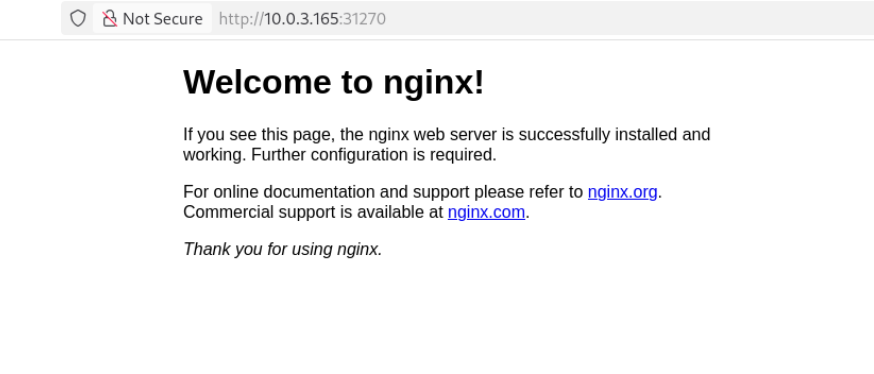
실행 중인 워커1이 아닌 워커3으로 접근을 했지만 클러스터 자체에서 31270으로 뚫어 놨으니 접근이 가능하다.
컨트롤 플레인으로도 접근이 가능
이로써 Opentofu와 Ansible을 이용해 vm 생성부터 클러스터 구축까지 완료했다!
'리눅스 > 실습' 카테고리의 다른 글
| 모니터링 서버 구축해보기-2 (1) | 2025.11.14 |
|---|---|
| 모니터링 서버 구축해보기-1 (0) | 2025.11.14 |
| 내부 저장소 구축과 연동 - 2 (0) | 2025.11.10 |
| 내부 저장소 구축과 연동 - 1 (0) | 2025.11.10 |
| IaC 실습하기-3 (0) | 2025.11.10 |