노트북의 Hyper-V에서는 VM을 4대 이상 올리기가 버거워 환경을 옮겨서 다양한 작업을 해보기로 한다.
최근에 클라우드 교육 과정을 들으면서 운이 좋게도 강사님께서 운영하시는 오픈스택 클라우드 서버 환경을 제공받아 사용할 수 있게 되었었다.
교육이 끝났지만 너무 감사하게도 강사님께서 무료로 최대 20대 가량의 인스턴스를 올리고 여러 작업을 할 수 있는 환경을 계속해서 제공해주심.
메모리도 매우 넉넉해 8GB씩 여러 대를 할당해도 충분한 IaaS 서비스를 이용할 수 있게 됨
그래서 자원도 넉넉하고 여러대 생성도 가능하니 IaC로 쿠버네티스 클러스터를 구축함 오픈토푸, 앤서블을 사용해 인스턴스를 만들고 컨트롤 3대 워커 5대로 구성할 예정
오픈토푸는 테라폼의 라이선스 정책 변화로 포크한 오픈소스로 mysql - mariadb와 같이 terraform - opentofu 이러한 관계로 볼 수 있음
IaC 커맨드 인스턴스를 하나 생성해주고 작업하기 쉽게 root로 들어가서 일단 앤서블과 토푸 디렉터리로 작업 디렉터리를 나눠줌
[root@IaC ~]# mkdir ansible
[root@IaC ~]# mkdir opentofu
[root@IaC ~]# ls
ansible  opentofu
그리고 앤서블과 토푸를 설치부터 하면 됨. 토푸는 직접 웹에서 가져와야 함
https://opentofu.org/docs/intro/install/ 여기서 배포판에 맞게 wget이나 curl로 다운 어차피 명령어도 친절하게 다 나와있음
앤서블은 그냥 받을 수 있음
[root@IaC ~]# curl --proto '=https' --tlsv1.2 -fsSL https://get.opentofu.org/install-opentofu.sh -o install-opentofu.sh
chmod +x install-opentofu.sh
./install-opentofu.sh --install-method rpm
rm -f install-opentofu.sh
[root@IaC ~]# dnf install -y ansible
테라폼이나 오픈토푸를 사용하려면 해당 환경이 돌아가는 클라우드 플랫폼 정보를 알아야 한다. 이걸로 인증해야 함
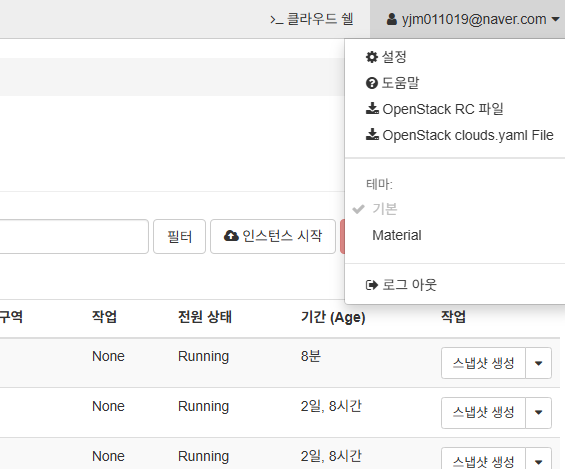
오픈스택의 경우에는 계정 밑에 RC 파일이나 yaml 파일을 다운받아 사용할 수 있다. 이걸 터미널로 복사해오면 됨
aws랑 azure 등도 이와 비슷
여기서는 yaml파일을 사용해보겠다. 다운받은 인증 파일을 .config 디렉터리를 만들어서 옮겨 자동으로 인식하게 하고 변수 지정
[root@IaC ~]# mkdir -p ~/.config/openstack
[root@IaC ~]# mv clouds.yaml ~/.config/openstack/
[root@IaC ~]# vi .bashrc
# .bashrc

# Source global definitions
if [ -f /etc/bashrc ]; then
        . /etc/bashrc
fi

# User specific environment
if ! [[ "$PATH" =~ "$HOME/.local/bin:$HOME/bin:" ]]
then
    PATH="$HOME/.local/bin:$HOME/bin:$PATH"
fi
export PATH

# Uncomment the following line if you don't like systemctl's auto-paging feature:
# export SYSTEMD_PAGER=

# User specific aliases and functions

alias rm='rm -i'
alias cp='cp -i'
alias mv='mv -i'
### ----- 이거 추가 -----
export OS_CLOUD="openstack"
그리고 clouds.yaml 여기에 비밀번호 정보가 없어서 추가해줌
[root@IaC ~]# vi ~/.config/openstack/clouds.yaml
-bash: ca: command not found
[root@IaC ~]# cat ~/.config/openstack/clouds.yaml
# This is a clouds.yaml file, which can be used by OpenStack tools as a source
# of configuration on how to connect to a cloud. If this is your only cloud,
# just put this file in ~/.config/openstack/clouds.yaml and tools like
# python-openstackclient will just work with no further config. (You will need
# to add your password to the auth section)
# If you have more than one cloud account, add the cloud entry to the clouds
# section of your existing file and you can refer to them by name with
# OS_CLOUD=openstack or --os-cloud=openstack
clouds:
  openstack:
    auth:
      auth_url: <오픈스택 주소>
      username: <오픈스택 사용자 계정>
      password: <오픈스택 사용자 비번> ## <= 이 부분 추가함
      project_id: c4adf84505f5489089a**********
      project_name: <오픈스택 플젝 이름>
      user_domain_name: <오픈스택 도메인>
    region_name: RegionOne
    interface: public
    identity_api_version: 3
그러면 이제 생성할 리소스들을 정의해줘야 하고 그 전에 프로바이더를 지정해줘야 함.
그래야 오픈토푸가 지금 어떤 클라우드 환경인지 이해하고 플러그인을 다운받음.
provider.tf를 작성하고 tofu init으로 작업디렉터리 초기화를 하면 리소스 생성 준비 끝
이제부터는 자원들을 생성하고 지정하고 등등 해야 하는데 gemini한테 물어보면서 했음
오픈스택 환경이 관리자가 아니므로 램, 메모리 등의 자원은 직접 생성할 수 없어 있는 걸로 맞춤
[root@IaC opentofu]# vi provider.tf
terraform {
  required_providers {
    openstack = {
      source  = "terraform-provider-openstack/openstack"
      version = "~> 1.50.0"
    }
    tls = {
      source  = "hashicorp/tls"
      version = "~> 4.0.0"
    }
    local = {
      source  = "hashicorp/local"
      version = "~> 2.4.0"
    }
  }
}


provider "openstack" {
  insecure = true
}
provider "tls" {}
provider "local" {}
[root@IaC opentofu]# tofu init
그 다음에 키페어랑 보안그룹, 네트워크, 등을 정해줌
[root@IaC opentofu]# vi keypair.tf
# 키페어 만들기
resource "tls_private_key" "k8s_ssh_key" {
  algorithm = "ED25519"
}

# 오픈스택에다가 키 등록
resource "openstack_compute_keypair_v2" "k8s_keypair" {
  name       = "k8s-keypair"
  public_key = tls_private_key.k8s_ssh_key.public_key_openssh
}

# 생성된 프라이빗 키 저장 (Ansible 접속용)
resource "local_file" "private_key_pem" {
  content         = tls_private_key.k8s_ssh_key.private_key_pem
  filename        = "/root/.ssh/id_ed25519_k8s"
  file_permission = "0400"
}
[root@IaC opentofu]# vi segroup.tf
# k8s 클러스터 보안 그룹 생성
resource "openstack_networking_secgroup_v2" "k8s_security_group" {
name = "k8s-cluster-sg"
description = "Security group for Kubernetes cluster nodes (HAProxy, Control, Worker)."
}
# SSH 접속 허용 (모든 노드)
resource "openstack_networking_secgroup_rule_v2" "ssh_ingress" {
direction = "ingress"
ethertype = "IPv4"
protocol = "tcp"
port_range_min = 22
port_range_max = 22
remote_ip_prefix = "0.0.0.0/0"
security_group_id = openstack_networking_secgroup_v2.k8s_security_group.id
}
# Kube API Server 외부 접근 허용 <- HAproxy로 로드밸런싱
resource "openstack_networking_secgroup_rule_v2" "kube_api_ingress" {
direction = "ingress"
ethertype = "IPv4"
protocol = "tcp"
port_range_min = 6443
port_range_max = 6443
remote_ip_prefix = "0.0.0.0/0"
security_group_id = openstack_networking_secgroup_v2.k8s_security_group.id
}
# 노드포트 전부 열기
resource "openstack_networking_secgroup_rule_v2" "nodeport_ingress" {
direction = "ingress"
ethertype = "IPv4"
protocol = "tcp"
port_range_min = 30000
port_range_max = 32767
remote_ip_prefix = "0.0.0.0/0"
security_group_id = openstack_networking_secgroup_v2.k8s_security_group.id
}
# 클러스터 내부 통신은 다 허용
resource "openstack_networking_secgroup_rule_v2" "k8s_internal_ingress_all" {
direction = "ingress"
ethertype = "IPv4"
protocol = ""
remote_group_id = openstack_networking_secgroup_v2.k8s_security_group.id
security_group_id = openstack_networking_secgroup_v2.k8s_security_group.id
}[root@IaC opentofu]# vi network.tf
# 플로팅 IP 리소스 생성
resource "openstack_networking_floatingip_v2" "haproxy_fip" {
pool = var.floating_ip_pool_name
}
# 플로팅 IP는 외부에서 트래픽을 받을 HAProxy한테
resource "openstack_compute_floatingip_associate_v2" "haproxy_fip_associate" {
floating_ip = openstack_networking_floatingip_v2.haproxy_fip.address
instance_id = openstack_compute_instance_v2.haproxy_server.id
}이제 여기에서 생성된 자원들은 변수로 따로 지정해줌
[root@IaC opentofu]# vi variables.tf
variable "image_name" {
  description = "VM 생성 OS 이미지 이름"
  type        = string
  default     = "lab-rocky-9"
}

variable "key_pair_name" {
  description = "VM들 접속에 사용될 SSH 키 페어 이름"
  type        = string
  default     = "k8s-keypair"
}

variable "network_name" {
  description = "VM 네트워크 이름"
  type        = string
  default     = "net-infra"
}

variable "floating_ip_pool_name" {
  description = "플로팅 IP를 할당받을 외부망 (HAProxy한테)"
  type        = string
  default     = "net-external"
}
이제 마지막으로 인스턴스를 생성하면 됨
[root@IaC opentofu]# vi instances.tf
# opentofu/instance.tf

# HAProxy 서버용 Flavor
data "openstack_compute_flavor_v2" "haproxy_flavor" {
  name  = "m1.medium"
}

# 컨트롤 노드 및 워커 노드용 Flavor
data "openstack_compute_flavor_v2" "k8s_node_flavor" {
  name  = "t1.kubernetes"
}

# HAProxy 인스턴스 1대 생성
resource "openstack_compute_instance_v2" "haproxy_server" {
  name            = "haproxy"
  flavor_id       = data.openstack_compute_flavor_v2.haproxy_flavor.id
  image_name      = var.image_name
  key_pair        = openstack_compute_keypair_v2.k8s_keypair.name
  security_groups = [openstack_networking_secgroup_v2.k8s_security_group.name]
  network {
    name = var.network_name
  }
}

# 컨트롤 노드 3대 생성
resource "openstack_compute_instance_v2" "control_plane" {
  count           = 3
  name            = "control${count.index + 1}"
  flavor_id       = data.openstack_compute_flavor_v2.k8s_node_flavor.id
  image_name      = var.image_name
  key_pair        = openstack_compute_keypair_v2.k8s_keypair.name
  security_groups = [openstack_networking_secgroup_v2.k8s_security_group.name]
  network {
    name = var.network_name
  }
}

# 워커 노드 5대 생성
resource "openstack_compute_instance_v2" "worker_node" {
  count           = 5
  name            = "worker${count.index + 1}"
  flavor_id       = data.openstack_compute_flavor_v2.k8s_node_flavor.id
  image_name      = var.image_name
  key_pair        = openstack_compute_keypair_v2.k8s_keypair.name
  security_groups = [openstack_networking_secgroup_v2.k8s_security_group.name]
  network {
    name = var.network_name
  }
}
나중에 앤서블로 클러스터 구성까지 해야 하므로 아웃풋도 만들어 준다.
[root@IaC opentofu]# cat output.tf
# HAProxy 서버의 내부 IP 주소
output "haproxy_internal_ip" {
  description = "HAProxy Server의 내부(Fixed) IP 주소"
  value       = openstack_compute_instance_v2.haproxy_server.network[0].fixed_ip_v4
}

# HAProxy 서버의 외부 IP 주소
output "kube_api_endpoint" {
  description = "Kubernetes API Server 접속용 Floating IP"
  value       = openstack_networking_floatingip_v2.haproxy_fip.address
}

# 컨트롤 노드들의 내부 IP 주소 목록
output "control_plane_ips" {
  description = "컨트롤 노드들의 내부 IP 주소 목록"
  value       = [for instance in openstack_compute_instance_v2.control_plane : instance.network[0].fixed_ip_v4]
}

# 워커 노드들의 내부 IP 주소 목록
output "worker_node_ips" {
  description = "워커 노드들의 내부 IP 주소 목록"
  value       = [for instance in openstack_compute_instance_v2.worker_node : instance.network[0].fixed_ip_v4]
}

# 모든 노드들의 내부 IP 주소 목록 (Ansible hosts 그룹 정의용)
output "all_nodes_ips" {
  description = "모든 K8s 노드들의 내부 IP 주소 목록"
  value       = concat(
    [for instance in openstack_compute_instance_v2.control_plane : instance.network[0].fixed_ip_v4],
    [for instance in openstack_compute_instance_v2.worker_node : instance.network[0].fixed_ip_v4],
  )
}
그리고 문제 없는지 확인하고 apply로 실행 시키면 끝
[root@IaC opentofu]# tofu fmt
instances.tf
output.tf
provider.tf
segroup.tf
[root@IaC opentofu]# tofu validate
Success! The configuration is valid.
[root@IaC opentofu]# tofu apply --auto-approve
tls_private_key.k8s_ssh_key: Refreshing state... [id=25508cc8a3af110f4cd006bf296183a3deddb7a5]
local_file.private_key_pem: Refreshing state... [id=8b51f04f03fa0832b23c531268d74ec7b7d3e2ce]
data.openstack_compute_flavor_v2.haproxy_flavor: Reading...
openstack_networking_secgroup_v2.k8s_security_group: Refreshing state... [id=a0e24613-3c35-4c6f-81c2-cc5d25e66f99]
openstack_networking_floatingip_v2.haproxy_fip: Refreshing state... [id=93e907ef-76db-44d6-8da9-6d68bfd4c3b8]
data.openstack_compute_flavor_v2.k8s_node_flavor: Reading...
openstack_compute_keypair_v2.k8s_keypair: Refreshing state... [id=k8s-keypair]
openstack_networking_secgroup_rule_v2.nodeport_ingress: Refreshing state... [id=f63afd80-faa7-4dbf-be80-31d543da589d]
...
그리고 대시보드 가서 보면 잘 생성됨

[root@IaC opentofu]# tofu output
all_nodes_ips = [
  "10.0.1.60",
  "10.0.4.53",
  "10.0.4.37",
  "10.0.3.211",
  "10.0.3.75",
  "10.0.1.12",
  "10.0.5.110",
  "10.0.4.38",
]
control_plane_ips = [
  "10.0.1.60",
  "10.0.4.53",
  "10.0.4.37",
]
haproxy_internal_ip = "10.0.2.7"
kube_api_endpoint = "121.254.163.235"
worker_node_ips = [
  "10.0.3.211",
  "10.0.3.75",
  "10.0.1.12",
  "10.0.5.110",
  "10.0.4.38",
]
아웃풋을 따로 만들어서 출력해서 확인도 가능
이제 앤서블로 클러스터 구성하면 됨
'리눅스 > 실습' 카테고리의 다른 글
| IaC 실습하기-3 (0) | 2025.11.10 |
|---|---|
| IaC 실습하기-2 (0) | 2025.11.09 |
| 웹서버에 TLS 적용하기 (0) | 2025.11.08 |
| 워드프레스 LEMP 서버 구축하기-2 (0) | 2025.11.08 |
| 워드프레스 LEMP 서버 구축하기-1 (0) | 2025.11.07 |